

Rules in Taseli: in a sentence, for one campaign, and preferences
Write a rule as a sentence and see what it would have done in 28 or 90 days, protect one campaign with “Don't touch” or a daily cap, and add preferences.
On this page
A rule tells Taseli what to do, or what not to do, in your account. There are three places to write one, depending on what you want:
| What you want | Where | Example |
|---|---|---|
| A rule with a condition and an action, or a limit that always holds | Settings › “Rules” | “If cost per lead goes above ₪80 three days in a row, lower the budget by 20%” |
| Protect one campaign | Results › the campaign › “Your rules here” | “Don't touch this campaign”, or up to ₪150 a day |
| A preference in free words | Settings › “What Taseli knows” › “Preferences” | For example “Never pause the Haifa campaign” |
The owner and admins set rules. The rest of the team sees them.
A rule in a sentence, checked against the past
Settings › “Rules”
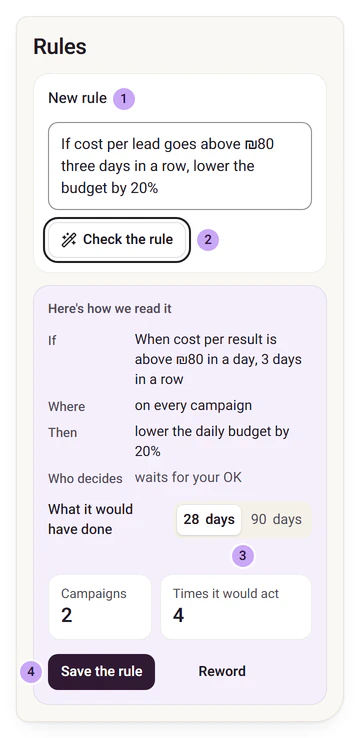
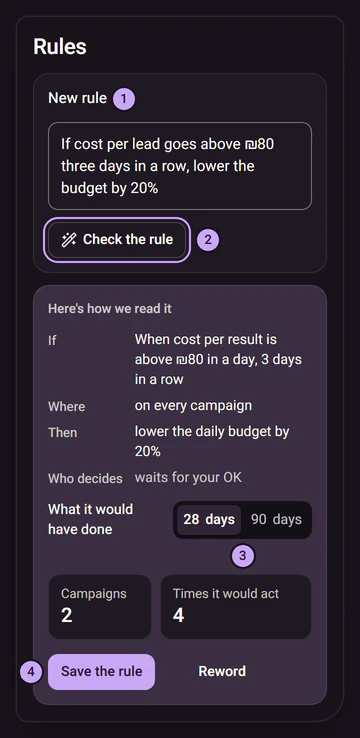
In the “New rule” box, write the rule in your own words, or tap one of the examples below it.Tap “Check the rule”
Taseli shows how it read it: If, Where, Then and Who decides.Pick a period
“28 days” or “90 days”. You see how many campaigns the rule would have touched, how many times it would have acted, and the spend and results around it.Tap “Save the rule”
Not what you meant? Tap “Reword” and write it again.
Two kinds of rule
| Kind | Example | What happens |
|---|---|---|
| Acts when something happens | “If cost per lead is above ₪80 for three days, lower the budget by 20%” | Checked once a day after the numbers update. When the condition holds: a proposed budget change, a proposal to pause the campaign, or a note to you |
| Always holds | “No ads on Shabbat”, “Never raise a budget above ₪300 a day” | Every change Taseli proposes is checked against it. The list says “Always holds” |
What a rule does, and doesn't
- A change to the account arrives as a decision in “To approve”, following what you set in “What Taseli does alone”.
- Pausing a campaign always waits for you, even when a rule asked for it.
- In a read-only account a rule changes nothing.
Manage the list
In “Your rules”, each rule has a “Rule on” switch, “What it would have done” and “Delete the rule”. Next to each one you see when it last acted and what happened: “Waiting for you in To approve”, “You got a note”, or why nothing was filed.
Deleting stops the rule. Changes already made stay, and you can undo them in “Results › What we did” for 30 days. See How to undo a change.
A rule for one campaign
Got a campaign you don't want changed, or one that shouldn't pass a certain amount a day? Set it on the campaign itself.
Results › tap the campaign
At the bottom of the panel that opens is “Your rules here”.Pick a rule
Turn on “Don't touch this campaign”, or tap “Set” next to “Daily cap” and enter an amount.“Save”
A short confirmation appears. From now on Taseli changes nothing there, or stays under the cap.
- “Don't touch”: no change in the campaign, including its ads and keywords. If something important happens, you get a note.
- Daily cap: the whole campaign's spend together stays under the amount. A proposed budget raise stops at it.
- To remove: “Remove cap”, or turn the switch off.
These rules are saved with everything Taseli knows, and also show under “All rules”.
Preferences in “What Taseli knows”
For things that are hard to put as a condition, like “never pause the Haifa campaign” or “don't raise budgets on weekends”.
Settings › “What Taseli knows”
In the “Preferences” group, write in the “Add a rule” field and tap “Add rule”.Or say it in the chat
Tell Taseli what not to do. “Don't do this” on a step in “What Taseli is doing” is saved as a preference too.
A preference Taseli can check in numbers is marked “Checked on every change”. To change or remove one, use the menu next to it: “Edit” or “Forget”.
Agencies: the agency's own “What Taseli knows” holds “Your agency's rules”, which apply to every client. A client's own rule comes before the agency's.
Troubleshooting
“We didn't fully get the rule”. Say what to watch, for how long and what to do. For example: if cost per lead is above ₪80 for three days, lower the budget by 20%.
“Only the owner or an admin can add rules”. Ask one of them to add it.
“Not enough stored days to check yet.” A new account. You can save the rule, and the check fills in later.
There's no “Your rules here” on the campaign. Someone who can't set rules sees that part only once a rule is set for the campaign.
FAQ
Can a rule change the account without asking? Only a budget change, and only if you already let Taseli change budgets alone. Pausing a campaign always waits for you.
What if two rules clash? The proposal is held back, and the rule says “Stopped: another rule or an earlier decision held it back”.
Does a rule hold on every platform? Yes, unless you named a platform or a campaign. What Taseli understood shows on the Where line.