

When Taseli offers to work without asking
When changes of one kind keep working, Taseli offers to make them without asking. What the offer shows, its limit, the 7-day check and how to take it back.
What can be handed over
Budget changesSmall steps, inside the limit on the offer.
Blocking searchesSearches that bring no customers.
Pausing keywordsOnly keywords with no results.
Ad hoursWhen your ads run.
How it starts
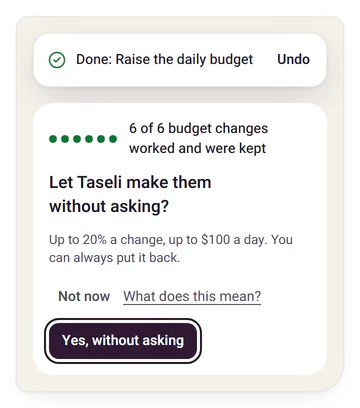
The offer shows up
Right after you approve a change like it, or on Home. A row of dots shows how each recent change went, filled for the ones that held.Answer it
“Yes, without asking”, or “Not now”: “Okay. Changes like this keep waiting for approval.” The offer comes back later, less often.The first two weeks
You hear about every change it makes, then once a week, with a line on how many changes ran without asking and how many held.
When every change has held for a while, Taseli may offer a higher limit. You choose; nothing grows by itself.
Taking it back
- One change. Undo it in Results › “What we did”. See how to undo a change.
- The whole kind. Open a change tagged “Without asking” and tap “Ask me first”: “Okay. From now on we ask first.” You can also switch the row off in Settings › “What Taseli does alone”.
- Taseli steps back by itself when changes of that kind keep being put back, or when someone on your side edits the same thing in the ad platform. It says so once, calmly.
Troubleshooting
I never got an offer. It takes several changes of one kind that worked. You can turn a kind on yourself in Settings › “What Taseli does alone”.
A big change waited even after “Yes, without asking”. It was past the limit, which is what the limit is for.