

The studio: carousel, versions and sizes
The studio in Creatives makes one creative, versions, a carousel or every size. What each option gives, what's free, and how it goes to an ad.
On this page
How to get there
Creatives in the menu opens as a window over Home. Under “More in creatives”, pick “Studio”. The “Make a creative” button above all your creatives does the same. The arrow at the top of the window steps back.
What you can make
When there are ready ideas for the business, they come first, under “Ready for you”. Each card: the idea already sketched, one line and why. “Make the creative” makes it at once, with the price on the button. “Not now” moves to the next idea, and “Why not?” teaches Taseli what doesn't fit.
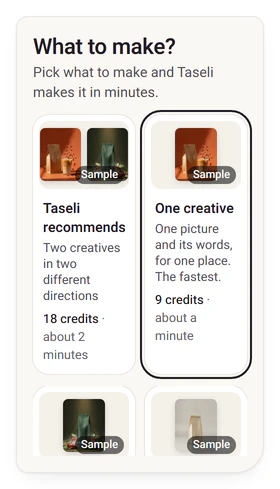
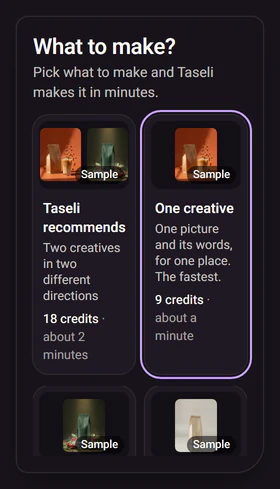
Below them, “Or pick a kind of creative”: tiles, each with its price in credits and how long it usually takes, such as “about a minute”.
| Tile | What you get | Price |
|---|---|---|
| “Taseli recommends” | Taseli chooses what to advertise and makes two creatives in two directions, each with one line on why | On the tile |
| “One creative” | One picture and its words, for one place. The fastest | On the tile |
| “A few versions” | Two more versions of your best creative, keeping its message | On the tile |
| “Every platform” | One creative in every size of your connected platforms | You pay for one; the other sizes are free |
| “Carousel” | 3 to 10 cards that swipe in the Meta feed | On the tile |
| “Improve a creative” | Change the words, the background or the size | Words and size are free |
A tile that doesn't fit the business isn't shown: “Improve a creative” needs a creative in the library, and a carousel needs pictures or products. Under the tiles, “More ways” holds “From product to creative” and “Fit it everywhere”.
One creative, step by step
“Studio” › “One creative”
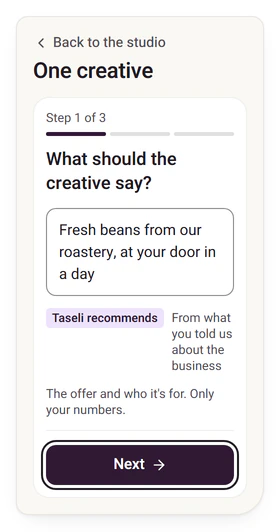
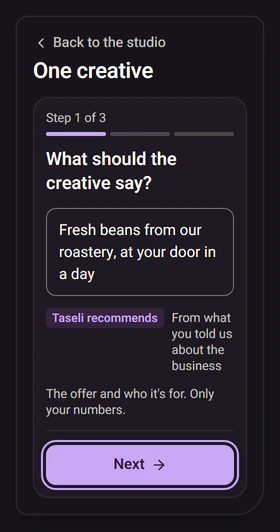
“What should the creative say?”, then “Next”
The answer is already in, with “Taseli recommends” and where it came from, such as “From the deal running now”. Change it as you need: the offer, and for whom. Only numbers you wrote appear.“Where will it show?”
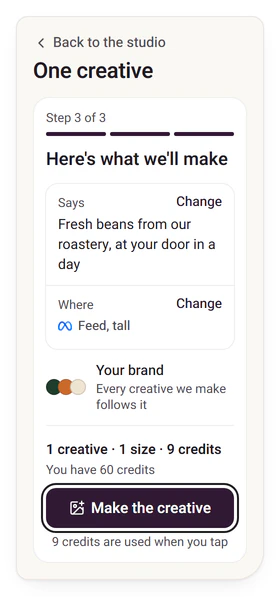
The recommended place is already chosen, with a line on why. For example, Facebook and Instagram's tall feed takes the most screen.“Here's what we'll make”, then “Make the creative”
Each line has “Change”, “Your brand” that the creative follows, and the price, such as “1 creative · 1 size · …”. How many creatives to make: under “Advanced settings”.Wait, or leave
You can leave meanwhile. A message comes when the creative is ready, and it's saved in Creatives.
Carousel for Meta
A carousel has 3 to 10 cards. Add them from “My pictures”, from “Products” on your site, or “Make one”. The first card opens the carousel; drag the cards or move them with the arrows. The last card shows your offer in your brand's colors. Square is always made, and “Also 4:5, taller in the feed” is free. The carousel goes to Meta, in an ad set that leads to your site.
Changing words and sizes, free
- “Change words”: tap a word on the creative and type. The headline, line, button and sticker update in every size, and you see “Changed. Free.” This works on a creative Taseli designed.
- “Something else (picture, colors, language)”: a paid change, priced before you tap.
- “Fit it everywhere”: the same creative laid out again for every size the business advertises in.
From creative to ad
Tap “Send to a Facebook ad”
Or Google, or TikTok, by the creative.Pick “Where it runs”, then “Send for approval”
Taseli suggests the place that fits. A read-only account isn't offered.Approve on the next screen
Only after you approve does the ad go to the platform.
On a ready creative you also have “Make one more like this”, “Ask for a change”, “Keep” and “Delete the creative”. See also ads from your own pictures, and brand.
Troubleshooting
“That's all for today on this account. It opens again tomorrow.” Each account has a daily limit.
“This needs … and you have …”. Add credits, or pick a cheaper option. See credits in the studio.
“Making creatives is paused for a moment. You weren't charged.” Try again in a few minutes.
“Taseli makes the finished creative once you pick a plan. The ideas and sketches here are free.” That's how it works during the trial. See the trial.
“The picture has letters we didn't write”. That creative won't be sent to an ad. Make another version or ask for a change.
A message that only the owner or an admin can make creatives. Making one spends the business's credits, so it's kept for them. Ask them, or for a role that fits: team and roles.
No “Studio” under “More in creatives”. The studio isn't open for this business yet. Make a new ad from Home: how to make a new ad.
FAQ
How is the studio different from “Create an ad” on Home? Home gives you an ad that joins a running campaign, in a few taps. In the studio you choose what to make: versions, a carousel or every size, and send it to an ad when you want.
What do I pay for, and what's free? You pay for new work: new words or a new picture. The same creative in another size and “Change words” are free. What doesn't come out isn't charged.
Can I make a video? Not right now. The studio makes pictures and carousels. A video you already have can be uploaded to Creatives and put in an ad.
Can I leave while it's being made? Yes. It keeps going, and a message comes when the creative is ready.